Sometimes, you may need to perform some actions on your website frequently or at a specific time by calling a URL. So we provide this add-on ---Dedicated task. With this add-on, we will help to create a task on our task server and call the URL you provided according to your requirements.
Before you order this add-on, note that it can only be used to call URL. This means you will need to integrate what you want to trigger or execute into a URL. Then when the task server call the URL, actions behind the URL will run.
Note "Call URL" means send HTTP GET request to your URL. It is not like browser URL from browser, the browser will perform other options such as post or other requests. So if you want to trigger some special operations on your website or db, you will need to adjust your code to make sure a HTTP GET request is enough. Then create the task from Control Panel.
How to order it?
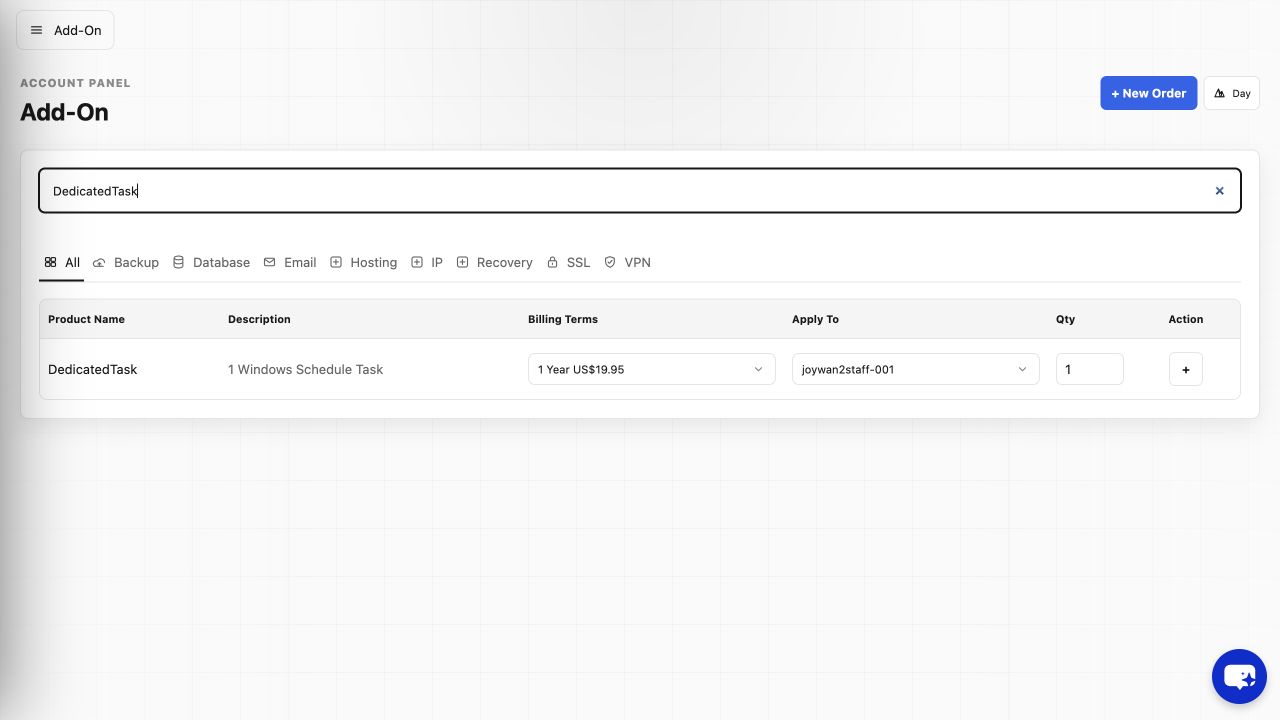
To order this add-on, please go to account > Add-Ons, search "DedicatedTask", select target hosting package you want to apply to and click "+" beside it .
How to set it up?
After you order this add-on, please login to your hosting control panel-->advanced tools-->Schedule Tasks, click "+Task" button, provide below info to create a new dedicated task
- The URL you want to call.
- The frequency to call it.
If you would love to excute the task at specific time, please submit a ticket to our senior technician to update the task manuall for you, just provide us the detailed time and timezone to start to call it.
How to manage it or check log?
For the dedicated task, we still did not integrate the log into Control Panel. However, we can help to check task history from the server. So when you get any issue with the task, you can contact our engineers to check it.
Article ID: 2366, Created: August 2 at 6:26 AM, Modified: August 4 at 2:23 AM